How to Make Your First Children's Picture Book With AI
The short answer: lock the story first, build your characters and locations before you touch page one, generate one spread at a time, keep the words out of the art, and upscale at the end. The skill is not writing one clever prompt. It is building a small set of references so that every new image has something to match.
This guide comes from making Floria, the Cotton Candy Princess, a 14-spread picture book for ages 4 to 6, which you can read in full on this site.
Who this suits
This workflow fits a parent, teacher, or grandparent making a book for a particular child or classroom. It also fits a creator who wants to learn the process before paying an illustrator.
Skip it if you want a traditional publishing deal. A strong manuscript is what you would submit, not a finished AI-illustrated book. Think twice as well if you need full copyright protection over every image, for reasons explained below.
The order matters
Most first attempts go wrong by starting with page one. Here is the order Floria was made in, taken from the timestamps on the project files.
| Stage | What was made | Saved |
|---|---|---|
| Main character | Character sheet, then expression sheet | July 11, evening |
| Cast | Three friends, the beekeeper, a group picture | July 11, 23:36 to just after midnight |
| Locations | Castle, bedroom, kitchen, beekeeper's home, path, town square, night scene | July 12, from 00:12 to 14:30 |
| Spreads | All 14 story spreads | July 12, 14:43 to 17:12 |
| Cover | One wraparound image | July 12, 17:53 |
| Finishing | Upscaling, text, final PDF | July 12, finished by 21:09 |
Look at the spreads row. All 14 final images were saved within two and a half hours, about 10 minutes each. That pace came after the reference work was done.
Those times come from when files were saved, not from a time log, so they do not show total hours worked.
Skill 1: Plan the book in spreads
A reader sees two facing pages at once, so plan in spreads. Floria has one cover image and 14 story spreads, each twice as wide as it is tall. That shape gives you two 8.5-inch square pages side by side.
Most traditional picture books run about 32 pages, and Writer's Digest is a useful guide to the format. Guidance on length varies, but many sources point to roughly 250 to 600 words for young readers.
Skill 2: Lock the story before the art
Art is slow to change. Words are not. Use an AI assistant such as Claude to pressure-test the story first:
I want to write a picture book of 14 spreads for children aged 4 to 6.
It is about a little princess who learns what sharing means.
Ask me five questions about the characters and the tone.
Do not write the story yet.
Then ask for three plots, a spread-by-spread outline, and a critique. Ask it to read as a tired parent at bedtime and to mark every line that is hard to say aloud.
I wrote Floria's final words myself.
Three story techniques do most of the work, and all of them appear in Floria:
- Plant and pay off. Grandpa Honey's secret about sharing is planted on spread 7 and understood on spread 12.
- A running joke. Michel's failed sword becomes a floppy banana, then returns at the festival as the banana sword.
- A repeating pattern. "Twirled and twirled" and "spun and spun" give a read-aloud rhythm, and a child can join in.
Give every spread one job, and include one low moment. Floria collapses the caterpillar on spread 11, so the forgiveness on spread 12 means something.
Decide early who writes the words. It affects your rights and what you must disclose, as the publishing section explains.
Skill 3: Make a character sheet
Generate one image showing your main character from the front, side, and back on a plain background. This is the most valuable image in the project.
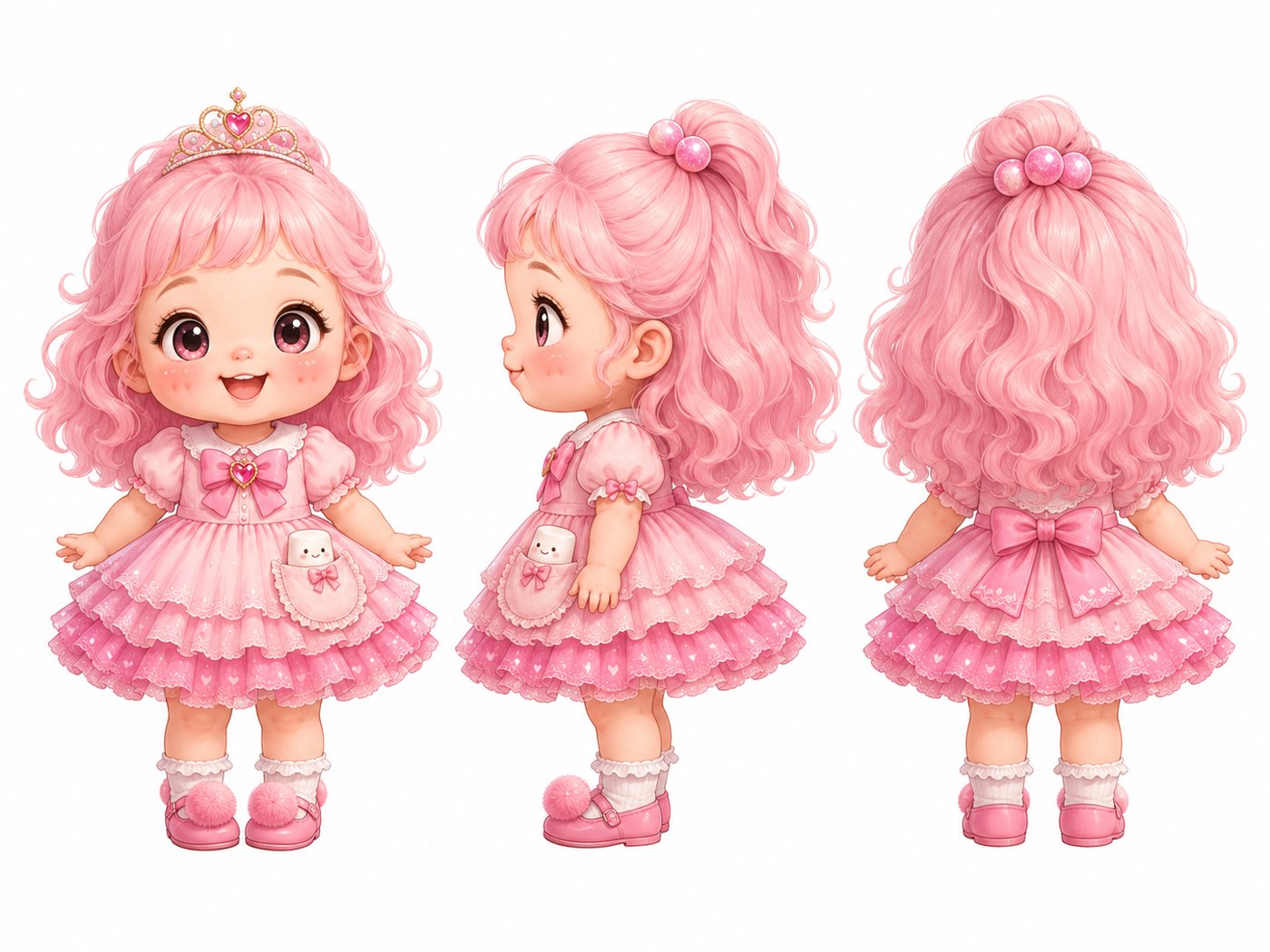
Character sheet for a children's picture book. A cheerful little
princess, about 4 years old, with long curly pink hair, a tiara, a
tiered pink dress with a marshmallow pocket, and pink shoes with
pompoms. Show her from the front, side, and back, standing, on a plain
white background. Soft watercolor style. No text.
The prompts in this guide are examples to adapt, not the exact ones used for Floria.
Give your character a few details that are easy to check on every page. Floria has pink hair, a tiara, and a marshmallow pocket. Simple, distinctive features survive better than subtle ones.
OpenAI's image guide recommends this approach for books: create a reusable character reference, then repeat the defining details in each new prompt.
Invent your character. Do not upload photos of a real child, and describe the style in your own words rather than copying a living illustrator.
Skill 4: Make an expression sheet
Read your story and list every emotion it needs. Then generate them all from the character sheet before you start the pages.
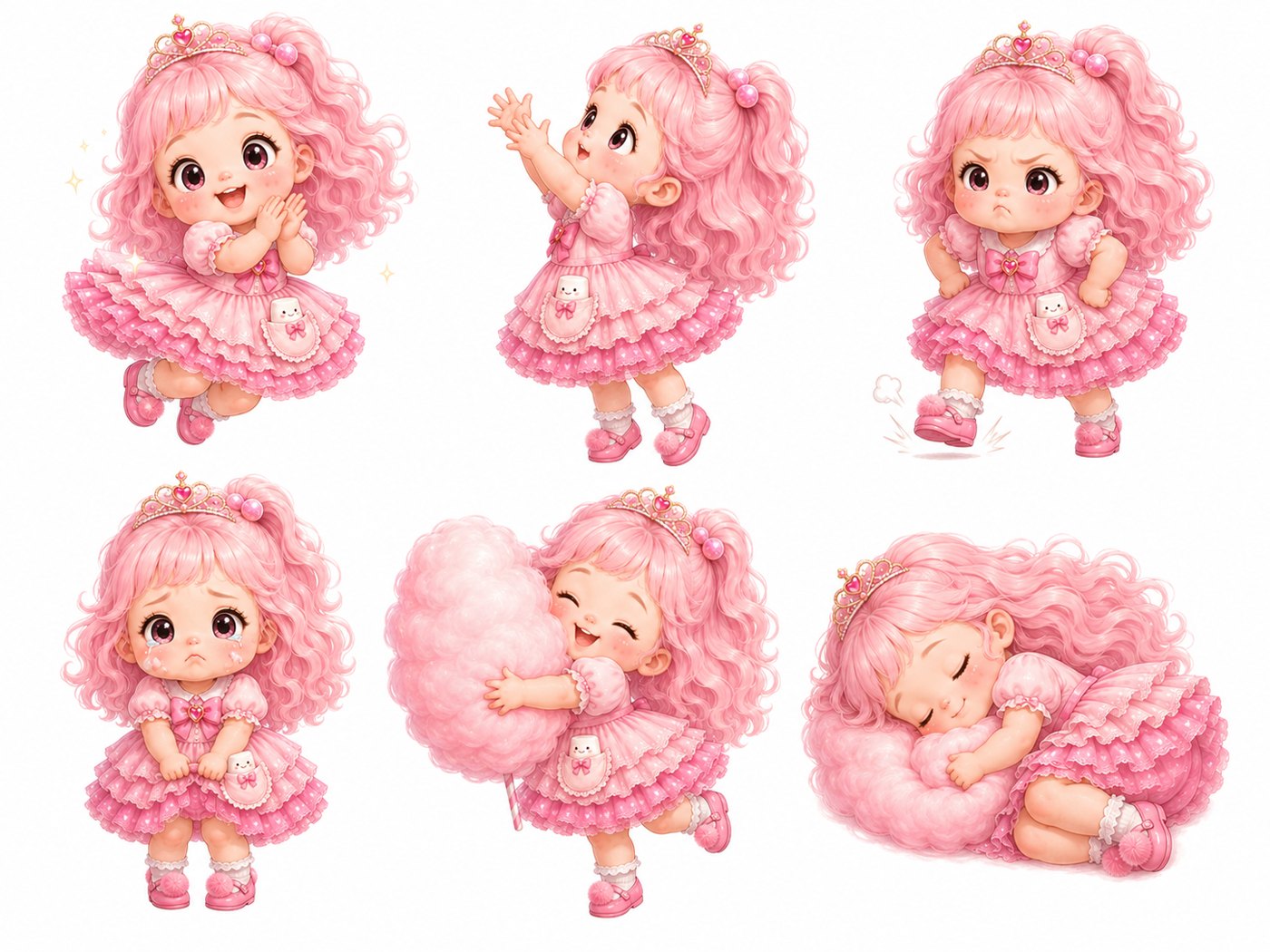
Each pose matches a moment in the story: stamping at the empty sugar jar, tears over the collapsed caterpillar, and sleep on the last spread.
Skill 5: Build the cast together
Create each supporting character, then put them all in one picture. This fixes their relative size. Without it, a character's height will drift from page to page.
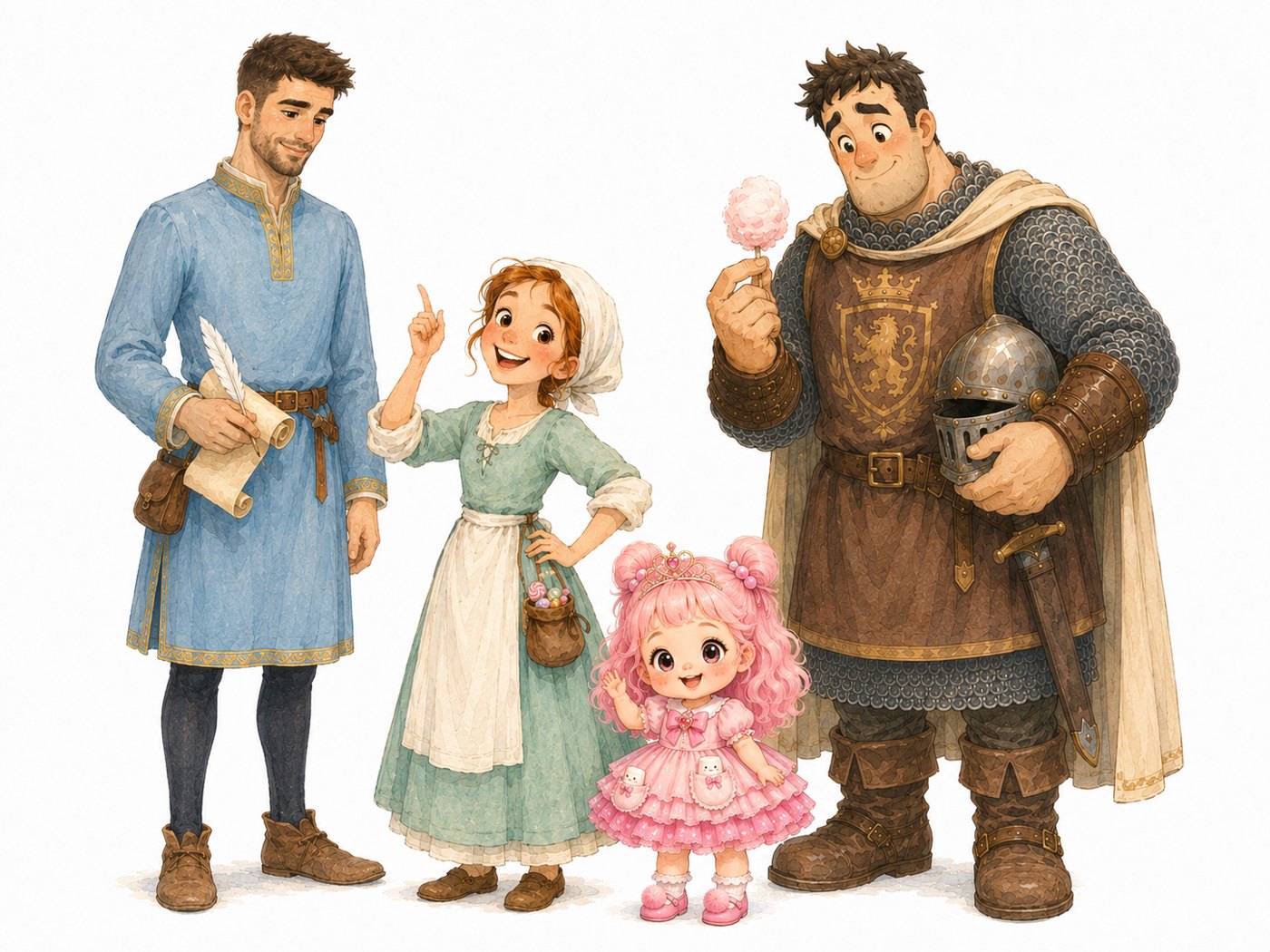
The size gap between tiny Floria and huge Michel is part of the humor, so it had to stay consistent.
Skill 6: Design your locations
List every place in the story, and generate each one empty. Floria needed seven: a castle, bedroom, kitchen, beekeeper's home, footpath, town square, and night scene.
Use these as references for your spreads. Your kitchen will then keep the same stove, window, and shelves from one page to the next.
Skill 7: Generate one spread at a time
Now each prompt can be short, because the references carry the detail. Attach the character, cast, and location images, then describe only what happens:
Using the attached references, create spread 5 of the book. Wide image,
twice as wide as it is tall. The friends are in the castle kitchen.
Floria peeks over the table beside an empty sugar jar, pouting. Keep
every character's face, clothes, and size the same as the references.
Same soft watercolor style. Leave the upper left empty for text. Keep
all faces away from the center of the image. Do not include any words.
Three lines in that prompt are doing special work:
- "Leave the upper left empty." You are reserving room for your words.
- "Keep all faces away from the center." The center is the fold of the book.
- "Do not include any words." Generated lettering is hard to edit and often wrong.
To revise, say "change only X and keep everything else the same." OpenAI's announcement of ChatGPT Images 2.5 says earlier changes are more likely to persist across long editing conversations, but check every image anyway.
Skill 8: Review like a continuity editor
After the last spread, line all your pages up and look for changes. Check hair, clothes, props, hands, and fingers, then check the story against the art.
Mistakes do get through. Floria's plan called for a giant cotton candy cloud on spread 11, and the final page became a caterpillar. The words were updated there, but spread 13 still says the big cotton candy cloud. In another of my books, a wooden boat turns into a round basket boat partway through. A sharp 4-year-old will notice both.
Skill 9: Upscale at the end
Generated images are too small to print. Floria's originals were 1,774 x 887 pixels, which is only about 100 pixels per inch across a printed spread. Amazon KDP says images should be at least 300 DPI.
I upscaled them four times in Upscayl, a desktop upscaling tool, using its digital art model. That gave 7,096 x 3,548 pixels, or about 400 pixels per inch at that size.
Do this last, because you do not want to upscale a page you will replace. Then inspect faces and fine detail at full size, since upscaling can invent or smear detail. Keep every original.
Skill 10: Add the words last
Keep a clean copy of every image with no text, and add the words in a layout tool. You can then fix a typo in seconds instead of regenerating a picture.
Three rules keep text readable:
- Check contrast on every spread. Light text can vanish on a busy background. On several Floria spreads, a soft cream panel behind the words solved this.
- Set the text large. It will be read aloud from a lap, often in dim light.
- Keep the same two fonts. Use one for reading and one for sounds like "Chomp! Splat!"
Avoid placing words across the center fold, where they disappear into the spine.
Skill 11: Reuse your art in another language
Because the words sit apart from the art, a new language means a new text layer and no new images. The English edition on this site was built from Floria's clean art and its original Chinese text.
Translating a picture book takes more than swapping words. Rewrite for rhythm, and expect English to run longer, which means moving text and sometimes shortening lines. Check names and any line that refers to the picture. Amazon also counts AI translations as AI-generated content that you must disclose.
Prepare the print file
These figures come from Amazon KDP's help pages. Check them again before you upload, since they can change.
- Trim size: 8.5 x 8.5 inches is a supported paperback size.
- Color: premium color on white paper starts at 24 pages for that size. Standard color starts at 72 pages, so it will not suit a short picture book.
- Bleed: art that runs to the page edge needs a page size of 8.625 x 8.75 inches, and you must upload a PDF.
- Pages: split each spread at the center fold, since KDP needs single pages rather than spreads.
- Safe area: keep important art and text at least 0.375 inches from the outside edges of a bleed book.
- Cover: use KDP's cover calculator to get the correct template for your page count.
Order a printed proof before you publish. Check the colors and margins, then read it aloud to a child in the target age group.
What happened when I made it
Floria went from first character sheet to finished PDF between the evening of July 11 and the evening of July 12, 2026.
This guide covers the method and what my project files show. It does not include total hours, costs, or printed proof results, so run your own test before you commit to a schedule or budget.
Publishing and rights: read this before you upload
This section is general information, not legal advice. Rules differ by country.
Disclosure. KDP's content guidelines require you to disclose AI-generated text, images, and translations when you publish, and this includes cover and interior art. Content counts as AI-generated even if you edit it substantially afterward. Using AI only to brainstorm, edit, or refine work you created yourself counts as AI-assisted, and you do not need to disclose that. So ChatGPT art means disclosure, whichever way you handled the words. If an AI drafted the story, disclose that too. For Floria, I wrote the original story, so the images and the AI-assisted English translation are what need disclosing. I also tell readers on the book's page.
Copyright. The US Copyright Office's 2025 report concludes that AI output is protected only where a human determined sufficient expressive elements, and that prompts alone do not currently give enough control. Using AI as a tool does not bar protection for your own work, and neither does including AI material in a larger human-made work. In practice, your own words and creative arrangement are on stronger ground than a raw generated image. Someone else may be able to reuse that image.
Tool terms. Anthropic's consumer terms assign you whatever rights it has in outputs. Read the current terms for both tools yourself, including the sections on commercial use and on whether your content is used for training.
Limitations
Generated art can look generic, and a book made from it may struggle to stand out next to professionally illustrated titles. Word prompts are also a weak way to get an exact composition, so a scene you can picture clearly may take many attempts.
An AI story can read smoothly but lack a real child's sense of humor. Your own ear and a real reader matter more than any tool.
The alternative: hire an illustrator
You can write the story with AI help and pay a human illustrator for the art. It usually costs more and takes longer, but you avoid AI image disclosure, and you can agree in a contract who owns the work. A good illustrator also brings ideas to the page that your prompts would never reach.
If the book is a private gift, the simplest option may be to print a single copy for your family.
Sources
- Amazon KDP content guidelines
- Amazon KDP trim size, bleed, and margins
- Amazon KDP paperback formatting issues
- Amazon KDP paperback cover guide
- US Copyright Office: Copyright and AI, Part 2
- OpenAI image prompting guide
- OpenAI: Introducing ChatGPT Images 2.5
- Anthropic consumer terms
- Writer's Digest: Defining picture books