Tested
How to Build a Client Info Remover With Claude Code
Why client details should never reach an AI model, and how I built WP Guard, a local tool that masks audit files and restores them after.
- Published
- Nov 3, 2026
- Tested
- Nov 3, 2026
- Reviewed by
- Noa Lin
- Paid links
- None
- Reading time
- 9 min
The short answer: before a client file goes anywhere near an AI model, run it through a tool on your own computer that swaps every name and number for a code such as CLIENT_0001. Keep the list of codes in an encrypted file that never leaves your machine. Let the AI work on the masked copy, then swap the real details back into its output. I built a tool that does this, called WP Guard, with Claude Code.
WP Guard is for audit working papers. The AI helps prepare the papers, but it only ever sees codes. A company name becomes CLIENT_0001, a director becomes PERSON_0003, and a bank account becomes ACCT_0002. The real values come back only at the end, on my computer.
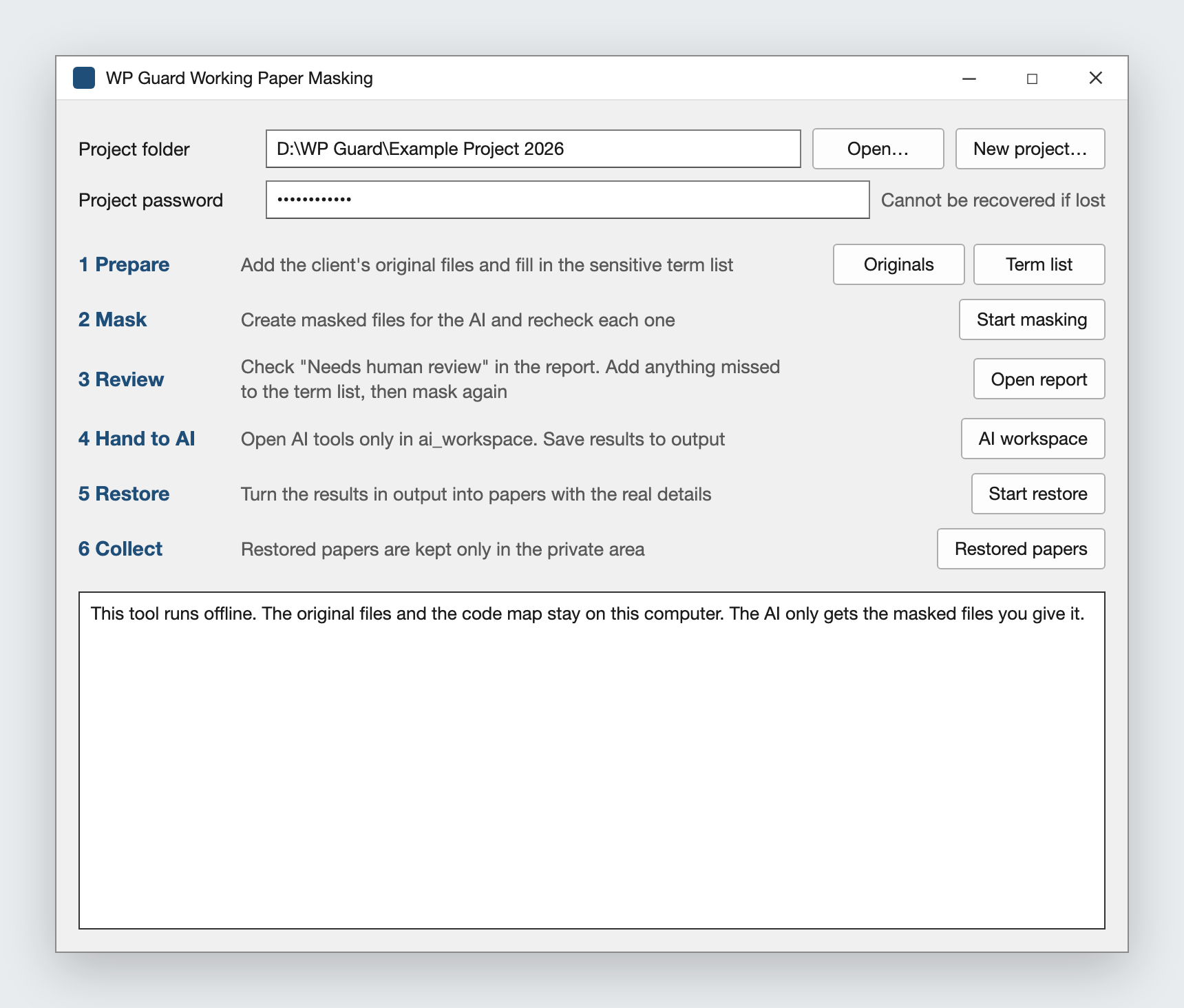
The WP Guard window. The real interface is in Chinese; this image shows the same layout with its labels translated into English for this article.
I built it for one reason: I did not want my clients' sensitive information used by AI companies to train their models.
This is a guide to one safety layer, not legal or ethics advice. Check your firm's policy and your client agreements before any client material goes to an AI tool, masked or not.
Why it matters
Accountants owe their clients confidentiality. The international code of ethics for accountants, published by the International Ethics Standards Board for Accountants (IESBA), lists it as one of five fundamental principles. Confidential client information must not be disclosed outside the firm without proper and specific authority, unless there is a legal or professional duty or right to disclose.
An AI provider is outside the firm. Provider terms help, but they do not change that. Anthropic's privacy centre says that, by default, it does not train models on inputs and outputs from its commercial products, including the API. It also says API inputs and outputs are deleted within 30 days by default, with exceptions such as chats flagged for usage policy review. Your client's details would still sit on someone else's servers for that time.
Masking means the riskiest details never make the trip. It is also easier to defend than a promise that nobody pasted anything they shouldn't have.
What leaves the computer and what does not
| What | Leaves the computer? |
|---|---|
| Original files, the code map, the term list, restored papers, reports | No. They stay in a private folder. |
| Masked files, with names, ID numbers and accounts replaced by codes | Yes. These are what the AI reads. |
| Amounts, dates, ratios, account captions, industry descriptions | Yes. They are not masked by default, because the AI needs them for the analysis. |
That last row matters. Masking lowers the risk, but it is not anonymisation. Amounts and a business description together can still point to a client, especially a listed company or a market leader.
Who this suits
This fits you if you work with client documents and want AI help without sending names, ID numbers or account details. Auditors, accountants and bookkeepers are the obvious fit, and so is any practice whose files are full of identifiers.
Skip it if you only need AI for general questions. Ask without client details instead, and you need no tool at all.
Skip it too if your firm's policy or your client agreement bans client material, masked or not, from AI tools. A remover does not override either one.
How to build one with Claude Code
1. Decide what must never leave
Write this down before any code. WP Guard masks clients, related parties, other companies, banks, people, addresses, ID numbers, bank accounts, phone numbers, email addresses, websites and registration or tax numbers. Everything else passes through.
2. Start with a term list, not detection
Automatic detection is good at numbers and weak at names. So the most reliable part of WP Guard is a spreadsheet you fill in for each client: the client, its subsidiaries, related parties, directors and senior staff, major customers and suppliers, and banks, with every alias and short form. An allow list holds words that look sensitive but are not, such as a regulator's name.
Detection then catches what the list missed. It checks numbers with a fixed format, such as ID cards, company registration codes and bank cards, against their check digits, so ordinary numbers are not masked by mistake.
3. Make the codes reversible and lock the map
Each value gets a code, and the same value always gets the same code within a project. That is what lets you restore the AI's output. The map from codes to real values is encrypted with a project password. WP Guard derives a key from the password with scrypt and encrypts the map with AES-256-GCM, using a standard cryptography library.
Ask Claude Code to use a well-known library for this. Do not let it invent its own encryption. And keep the password safe: if it is lost, the map cannot be opened and nothing can be restored.
4. Clean the places people forget
A spreadsheet is not just its cells. WP Guard also masks comments, tracked changes, headers and footers, hidden sheets, pivot table caches, charts, text boxes, document properties and Office files embedded inside other files. Images inside documents are replaced with blanks, because a stamp, a signature or a scanned ID card cannot be masked as text.
PDFs with a text layer are converted to text. Scanned PDFs are read by an OCR engine that runs on the computer, so no image is sent anywhere. The first version could not read photos, so I had Claude Code add OCR for JPEG files in version 2.
5. Fail closed, then check again
Anything the tool cannot handle stays out of the AI folder: old .xls and .doc files, password-protected files and unknown embedded objects. After masking, WP Guard opens every output file again and scans it for known terms and suspicious numbers. If anything is found, the file is held back and listed in the report.
6. Cut the tool off from the internet
The first thing WP Guard does when it starts is disable network access inside its own process, so no library it loads can send data out. The OCR engine's telemetry is switched off too. Only the install step needs the internet, to download the libraries and the OCR model.
7. Fence in Claude Code
The masked files go into an ai_workspace folder, and that is the only place to open Claude Code. WP Guard writes three things there.
A CLAUDE.md file gives the AI its rules: keep every code exactly as written, never try to guess who a code stands for, mark any number that came from OCR as "to be checked against the original", and report anything that still looks unmasked without repeating it.
A settings file denies reads and edits of the private folder and blocks the web tools:
{
  "permissions": {
    "deny": ["Read(../private/**)", "Edit(../private/**)", "Write(../private/**)", "WebFetch", "WebSearch"]
  },
  "hooks": {
    "PreToolUse": [{ "matcher": ".*", "hooks": [{ "type": "command", "command": "python .claude/guard.py" }] }]
  }
}
And a small guard script runs before every tool call. It refuses web tools, any mention of the private folder or the code map, file paths outside the workspace, and shell commands that use .. to climb out. In Claude Code, a PreToolUse hook that exits with code 2 blocks the call, and its message is shown to the AI.
BLOCKED_TOOLS = {"WebFetch", "WebSearch"}

def deny(reason):
    print("Blocked by WP Guard: " + reason, file=sys.stderr)
    sys.exit(2)
8. Restore and read the report
Before that, check the masking report. After the first OCR run, WP Guard produced an Excel spreadsheet listing every item that needed a human decision, such as lines the OCR could not read with confidence and names that looked like a misreading. Check it, correct it, and mask again if you added terms.
When the AI has written its papers into the output folder, WP Guard swaps the codes back and writes a restore report. Check it for any code that could not be restored. Aliases come back as the standard name from your term list. PDFs cannot be restored, so ask the AI for Excel, Word, Markdown, CSV or text.
9. Test it with fake data
WP Guard has automated tests that run on made-up clients only. Among other things, they check that nothing sensitive reaches the AI folder, that spreadsheets keep their formulas and structure, that a full round trip restores the originals, that unsupported files are blocked, that the console never prints a secret, that the network is blocked, and that the guard script blocks what it should.
A prompt like this is a good place to start with Claude Code:
Build a local Python tool that masks client names, ID numbers, bank accounts, phone numbers and email addresses in .xlsx, .docx and .csv files, replacing each value with a stable code such as CLIENT_0001. Store the map from codes to real values in a file encrypted with a project password, using a standard library. Write masked copies to an ai_workspace folder and restore codes in files the AI writes back. Block network access inside the tool. Refuse any file you cannot fully process. Write tests that use made-up data only, including one proving no known sensitive term appears in any masked file.
Then add one feature at a time, with a test for each. The term list, the hidden Office parts and the guard script all came after the first version worked.
What happened when I tested it
I tested WP Guard on real client files in PDF, Excel, Word and JPEG format, on my own computer.
After the first OCR run, WP Guard gave me an Excel spreadsheet of items that needed human review, which I checked and corrected.
Building the first version with Claude Code took about two hours. Version 2 added OCR for JPEG files, also built with Claude Code.
I have shared WP Guard with fellow accountants for testing.
Limitations
Names depend on your list. Detection finds people from context, such as a job title or a "Name:" label. A name that appears on its own and is not in the term list will be missed.
OCR can misread numbers with high confidence. A wrong account number gets masked and restored as the same wrong number. Every amount and number read from a scan must be checked against the original. The AI is told to flag OCR figures, but that depends on the AI following the rule.
Handwriting and grey stamps defeat it. Handwriting is usually unreadable, so it is hidden. A black and white stamp can cover text, and the covered text is simply missing, with no warning.
The guard stops mistakes, not deliberate bypasses. Claude Code's shell has no system-level sandbox here. The real rule is never to open an AI tool in the private folder or the project root.
The private folder is not encrypted. Only the code map is. Protect the folder as you would the original files.
It is built for one market. WP Guard detects mainland China and Hong Kong formats, its interface and term list are in Chinese, and it runs on Windows. Firms elsewhere would need new detection rules.
The alternative that costs nothing
The simplest remover is not sending client files. Ask the AI for templates, checklists and formulas using made-up figures, and do the client-specific work yourself.
If you need AI on real files, a model running entirely on your own computer keeps everything in the office. You give up some quality and speed, and you take on the setup.
Sources
Noa Lin runs Solo Tested alone. How this site works.